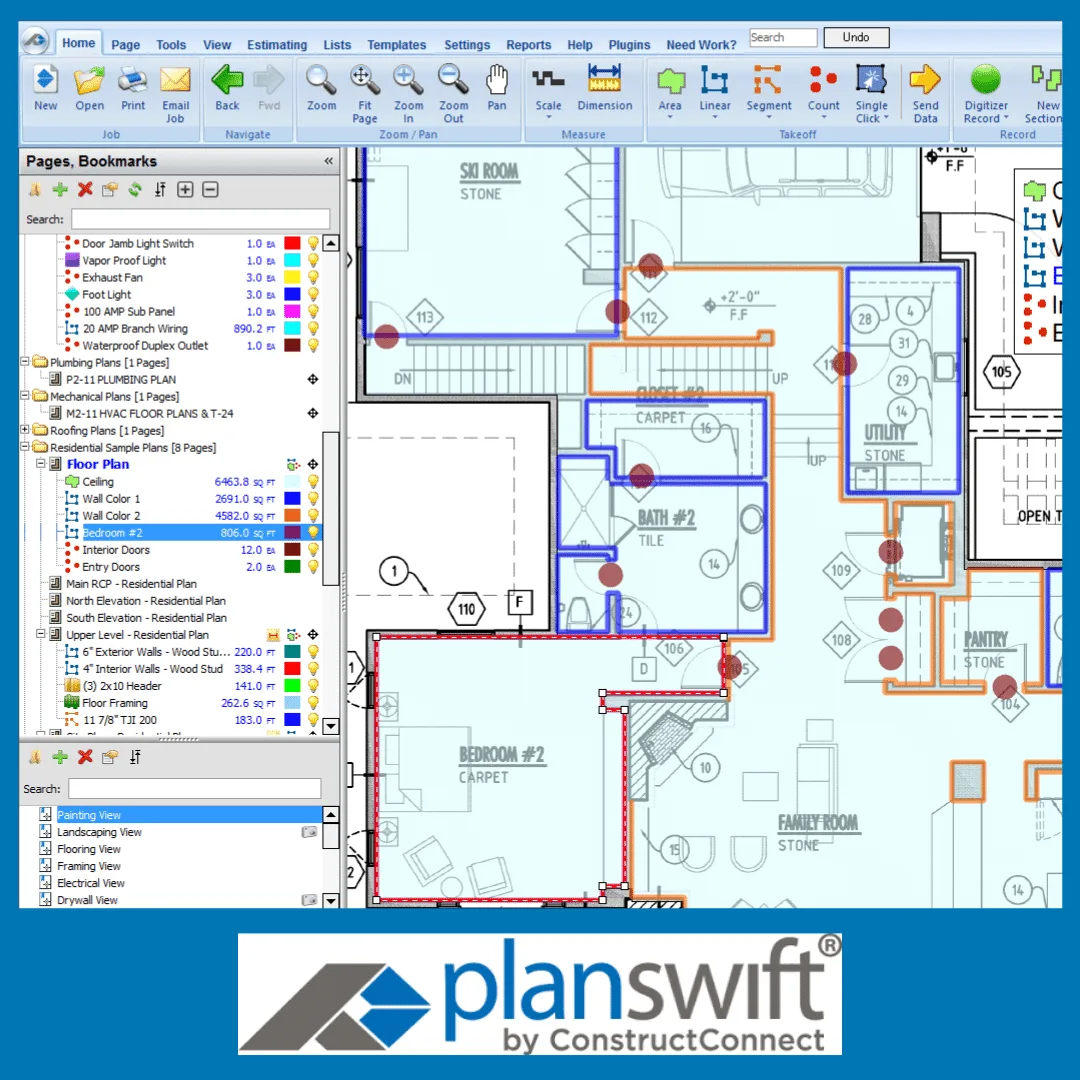
PlanSwift in Construction Projects: A Powerful Take-off and Estimating Software
Construction projects require careful planning, accurate measurements, and reliable cost estimates. From calculating material quantities to preparing a bill of quantities (BOQ), every step affects how effectively a project is priced and managed. When these tasks are completed manually, they can become time-consuming, especially when drawings contain many details or undergo frequent revisions.
This is where PlanSwift becomes useful. PlanSwift is a digital takeoff and estimating software that helps construction professionals measure quantities from drawings, organize project information, and support cost estimation.
Understanding PlanSwift use in construction can benefit quantity surveyors, construction estimators, contractors, and students who want to develop practical estimating skills. The software can help streamline measurement tasks, but achieving reliable results also requires an understanding of construction drawings, measurement methods, material specifications, and pricing.
In this guide, we explain how PlanSwift is used in construction projects, the tasks it supports, how to approach a digital quantity takeoff, and which skills help you use the software effectively.
What Is PlanSwift and How Is It Used in Construction?
PlanSwift is construction takeoff and estimating software that allows users to measure quantities directly from digital project drawings. Instead of relying entirely on printed plans, manual calculations, and separate measurement sheets, users can work with digital drawings and organize measurements within a project.
PlanSwift is commonly used to support tasks such as:
Measuring lengths, areas, and counts from construction drawings.
Calculating quantities for selected building materials and work items.
Organizing takeoff information by trade, floor, or project section.
Applying unit rates and material costs to measured quantities.
Creating measurement summaries and exporting takeoff information.
Supporting the preparation of estimates and bills of quantities.
For example, a quantity surveyor working on a residential building may need to calculate quantities for concrete, formwork, blockwork, plastering, flooring, and painting. PlanSwift can help organize these measurements in a digital environment, making it easier to review quantities and prepare information for the estimate.
However, the software does not automatically guarantee an accurate estimate. The user must select the correct measurement methods, check the drawings, account for relevant specifications, and review the final calculations.
Why Is PlanSwift Important for Construction Quantity Takeoff?
Quantity takeoff is an essential part of construction estimating. It involves identifying work items from drawings and calculating the quantities required for pricing, procurement, and project planning.
PlanSwift can make this process more organized by bringing digital measurement tools and takeoff information into one workflow.
1. Faster Digital Measurement
Measuring from printed drawings can involve repeated calculations and manual record-keeping. When a drawing changes, the estimator may also need to revisit affected measurements.
PlanSwift allows users to measure supported digital drawings directly on screen. This can reduce repetitive work and make it easier to organize and review measurements.
The actual time saved depends on the project's complexity, the quality of the drawings, and the estimator's experience.
2. Improved Quantity Organization
Construction projects contain many different work items, and keeping measurements organized is essential.
PlanSwift can help users group takeoffs by building element, trade, floor, or other project categories. Clear organization makes it easier to review quantities, identify missing items, and trace measurements back to their drawings.
This is particularly useful when preparing estimates for projects with multiple work packages.
3. Support for Cost Estimation
Quantity takeoff provides the measurements needed to develop a construction estimate. Once quantities are established, the estimator can apply suitable unit rates to calculate item costs.
For example:
Estimated item cost = Quantity × Unit rate
If a floor finish measures 150 square metres and the applicable rate is 30 currency units per square metre, the estimated cost is 4,500 currency units.
This is a simplified calculation. A complete estimate may also need to consider labour, material wastage, equipment, productivity, overheads, profit, and other project-specific costs.
PlanSwift can support this process when the relevant item data, assemblies, and rates are configured correctly.
4. Better Support for BOQ Preparation
A bill of quantities provides a structured list of construction work items, descriptions, units, and quantities for estimating or tendering purposes.
PlanSwift can help produce and organize the quantity information needed for BOQ preparation. However, a takeoff report is not automatically a complete BOQ. The estimator may still need to check item descriptions, measurement rules, specifications, rates, and the required document format.
Combining digital takeoff skills with a sound understanding of BOQ preparation helps produce more useful estimating documents.
5. Easier Review of Measurements
A well-organized digital takeoff can make measurements easier to review and cross-check. Estimators can examine individual items, investigate unusual quantities, and check whether relevant drawing information has been included.
This does not remove the need for independent verification. Instead, it provides a more structured way to manage and review measurement work.
How to Use PlanSwift for Construction Estimating
Using PlanSwift effectively involves more than selecting measurement tools. A reliable workflow starts with understanding the project information and ends with checking and documenting the results.
Step 1: Review the Construction Drawings
Before opening the software, identify the drawings and information needed for the takeoff.
Depending on the project, these may include architectural plans, structural drawings, service drawings, schedules, specifications, and relevant details.
Check drawing revisions, dimensions, legends, and notes. If important information is missing or inconsistent, record the issue and seek clarification rather than relying on an unsupported assumption.
Step 2: Import Drawings and Set the Correct Scale
Import the supported drawings into PlanSwift and verify the scale before measuring.
An incorrect drawing scale can affect every measurement taken from that sheet. Use a known dimension or another reliable reference to check the scale.
If the project contains drawings at different scales, verify each sheet as needed.
Step 3: Select the Appropriate Takeoff Tool
Different construction items require different measurement approaches.
Area takeoff: Used for suitable items such as flooring, ceiling finishes, and painting areas.
Linear takeoff: Used for items measured by length, such as skirting and selected pipe runs.
Count takeoff: Used for repeated elements such as doors, windows, and fixtures.
Specialized calculations: Used when a work item requires additional calculations or a specific measurement approach.
Always check the project's measurement requirements. Selecting a tool is only one part of the process; the estimator must also understand the correct unit and measurement rules.
Step 4: Measure and Organize Work Items
Measure each item systematically and organize the results using clear names and categories.
For example, floor finishes can be grouped by building level or room, while structural quantities can be organized by element or work package.
Consistent organization helps prevent omissions and double-counting. It also makes it easier for another estimator or quantity surveyor to review the takeoff.
Step 5: Apply Necessary Calculations
Some construction quantities require more than a direct measurement.
Depending on the work item, you may need to consider deductions for openings, additional allowances, conversion factors, material wastage, or other project-specific requirements.
Apply these adjustments according to the relevant specifications and measurement rules. Do not assume that the software automatically understands every construction requirement.
Step 6: Add Relevant Cost Information
Once the quantities have been measured and checked, apply appropriate unit rates where cost estimation is required.
Review the rate components, including materials, labour, equipment, and other applicable costs. Confirm that the rates reflect the project's location, specifications, and estimating assumptions.
A correctly measured quantity can still produce an unreliable estimate if the rate or its inclusions are incorrect.
Step 7: Check and Export the Results
Review the completed takeoff against the drawings and available schedules.
Check the scale, units, item descriptions, deductions, repeated elements, and drawing revisions. Cross-check important quantities independently where practical.
After reviewing the measurements, export the relevant information using the available reporting options. Complete any additional formatting, BOQ preparation, or commercial checks needed for the final deliverable.
Which Construction Works Can Be Measured Using PlanSwift?
PlanSwift can support different types of construction takeoff, depending on the drawings, project requirements, and configured measurement tools.
Architectural Quantity Takeoff
Architectural takeoffs may include floor finishes, wall finishes, plastering, painting, ceilings, doors, windows, and other building components.
For example, an estimator may measure the floor area of each room, calculate suitable wall finish quantities, and count doors and windows. The final quantities should be checked against schedules, specifications, and relevant measurement rules.
Civil and Structural Quantity Takeoff
Civil and structural estimating may involve excavation, filling, concrete, formwork, masonry, and other construction work items.
These tasks require an understanding of structural drawings, dimensions, construction methods, and measurement conventions. Reinforcement quantities may also require additional calculations using structural details and bar schedules.
Mechanical, Electrical, and Plumbing Takeoff
MEP quantity takeoff involves measuring and counting components associated with building services.
Depending on the project, this may include ductwork, piping, air outlets, equipment, cable routes, lighting fixtures, and other services elements.
MEP estimating requires careful interpretation of service drawings, schedules, and specifications. PlanSwift can support suitable measurement workflows, but the estimator must understand the relevant systems and verify that the required components have been included.
Common PlanSwift Mistakes and How to Avoid Them
Digital software can improve the measurement workflow, but errors can still occur when the drawings, setup, or estimating assumptions are incorrect.
Incorrect drawing scale: Verify the scale before starting and check it again when working with drawings at different scales.
Outdated drawings: Confirm drawing revisions and use the latest approved information available for the estimating task.
Missing or duplicated quantities: Organize measurements by trade, floor, or work package and use a consistent checking process.
Incorrect measurement units: Confirm whether each item should be measured in metres, square metres, cubic metres, numbers, or another unit.
Unsuitable unit rates: Check the scope of each rate, material specifications, labour requirements, productivity assumptions, and project conditions.
Insufficient quantity checking: Review important measurements against drawings, schedules, and independent calculations where appropriate.
Poor takeoff organization: Use clear descriptions and consistent categories so that quantities can be reviewed and traced to their source.
The goal is not simply to complete the takeoff quickly. It is to produce quantities and cost information that can be understood, checked, and used confidently.
What Skills Do You Need to Use PlanSwift Effectively?
Learning PlanSwift is most valuable when software knowledge is combined with construction measurement and estimating skills.
Important skills include:
Reading architectural, structural, and MEP drawings.
Understanding quantity takeoff principles and measurement units.
Importing drawings and checking their scales.
Using digital measurement tools appropriately.
Organizing takeoffs by trade and work package.
Understanding unit rates and basic cost estimation.
Preparing and checking bills of quantities.
Reviewing drawing revisions and project specifications.
Exporting, documenting, and presenting quantity information.
Beginners should start with drawing setup and basic measurement tools before progressing to more complex work items, assemblies, and cost calculations.
Practicing with real or realistic project drawings can help you understand how software functions relate to the daily responsibilities of a quantity surveyor or construction estimator.
Learning PlanSwift is most valuable when software knowledge is combined with construction measurement and estimating skills.
Important skills include:
Reading architectural, structural, and MEP drawings.
Understanding quantity takeoff principles and measurement units.
Importing drawings and checking their scales.
Using digital measurement tools appropriately.
Organizing takeoffs by trade and work package.
Understanding unit rates and basic cost estimation.
Preparing and checking bills of quantities.
Reviewing drawing revisions and project specifications.
Exporting, documenting, and presenting quantity information.
Beginners should start with drawing setup and basic measurement tools before progressing to more complex work items, assemblies, and cost calculations.
Practicing with real or realistic project drawings can help you understand how software functions relate to the daily responsibilities of a quantity surveyor or construction estimator.
Is Learning PlanSwift Useful for Your Construction Career?
PlanSwift can be a useful skill for quantity surveyors, estimators, contractors, and other construction professionals who work with digital drawings and cost estimates.
It can help you organize measurements, support estimating tasks, and develop a more structured approach to quantity takeoff. However, learning the software alone does not replace the broader knowledge required for quantity surveying.
Employers and clients also value drawing interpretation, measurement standards, BOQ preparation, cost awareness, attention to detail, and the ability to explain how quantities were calculated.
If you are a student or beginner, learning PlanSwift alongside quantity surveying fundamentals can help you build practical skills. If you already work in construction, further training may help you improve your workflow and handle more complex takeoffs.
PlanSwift can be a useful skill for quantity surveyors, estimators, contractors, and other construction professionals who work with digital drawings and cost estimates.
It can help you organize measurements, support estimating tasks, and develop a more structured approach to quantity takeoff. However, learning the software alone does not replace the broader knowledge required for quantity surveying.
Employers and clients also value drawing interpretation, measurement standards, BOQ preparation, cost awareness, attention to detail, and the ability to explain how quantities were calculated.
If you are a student or beginner, learning PlanSwift alongside quantity surveying fundamentals can help you build practical skills. If you already work in construction, further training may help you improve your workflow and handle more complex takeoffs.
Learn Practical PlanSwift Skills with Noble QS
Understanding the purpose of PlanSwift is a good starting point. The next step is learning how to apply it to construction drawings, measure quantities correctly, organize takeoff information, and support a complete estimating workflow.
Noble QS offers training options for learners who want to develop their PlanSwift and quantity surveying skills.
Understanding the purpose of PlanSwift is a good starting point. The next step is learning how to apply it to construction drawings, measure quantities correctly, organize takeoff information, and support a complete estimating workflow.
Noble QS offers training options for learners who want to develop their PlanSwift and quantity surveying skills.
Ready to Improve Your Takeoff Skills?
Join the PlanSwift Masterclass by certified trainer Saady Chohan and learn to measure, organise and export quantities with confidence.
Start the PlanSwift Masterclass →New to quantity surveying? See the Fundamental QS Course with PlanSwift.
If you want to focus on the software itself, the PlanSwift Software Training Course is a relevant place to explore. Its published course information covers topics such as project setup, measurement takeoff, scale settings, templates, and exporting calculations.
If you are new to quantity surveying and want to develop broader estimating skills alongside PlanSwift, you can also review the Fundamental Quantity Surveying Course with PlanSwift Training.
Before enrolling, consider your current experience, the types of construction work you want to measure, and the practical exercises included in the training.
Ready to improve your construction takeoff skills? Explore the available Noble QS training options and choose a learning path that matches your experience and professional goals.
Frequently Asked Questions
1. What is PlanSwift used for in construction?
PlanSwift is used to measure quantities from digital construction drawings and support estimating workflows. It can help users calculate lengths, areas, and counts, organize takeoff information, and prepare data for cost estimation and BOQ work.
2. Can PlanSwift be used for quantity takeoff?
Yes. PlanSwift is designed to support digital quantity takeoff. Users can measure appropriate construction items from drawings, organize quantities, and review the results before using them in estimates or BOQs.
3. Can PlanSwift calculate construction costs?
PlanSwift can support construction cost estimation when suitable rates, item data, and calculations are configured. The reliability of the result depends on accurate quantities, appropriate rates, and correct estimating assumptions.
4. Can PlanSwift be used for architectural and structural work?
It can support suitable architectural and structural takeoff tasks, including measurements and counts for relevant building elements. The measurement approach depends on the item, drawing information, and project requirements.
5. Is PlanSwift useful for MEP quantity takeoff?
PlanSwift can support suitable MEP measurement tasks, including quantities for selected ductwork, piping, equipment, and other service components. Accurate results require appropriate drawings and knowledge of the relevant building systems.
6. Can beginners learn PlanSwift?
Yes. Beginners can start with project setup, drawing scales, basic takeoff tools, and simple measurement tasks. Learning construction drawings and quantity surveying fundamentals alongside the software will help them apply it more effectively.
7. Is PlanSwift enough to become a quantity surveyor?
No. PlanSwift is a useful software skill, but quantity surveyors also need knowledge of construction methods, measurement rules, BOQs, cost estimation, specifications, and commercial practices.
8. Where can I learn PlanSwift for construction estimating?
PlanSwift helps construction professionals manage digital quantity takeoff and support estimating work in a more organized way. From measuring drawing elements to preparing quantity summaries, it can be a valuable tool when used as part of a well-structured estimating process.
However, accurate estimates still depend on correct drawing interpretation, appropriate measurement methods, reliable cost information, and careful checking.
Whether you are learning quantity surveying or looking to strengthen your existing estimating skills, developing practical PlanSwift knowledge alongside construction measurement fundamentals can help you work more confidently.
Explore the relevant Noble QS training options to take the next step toward improving your quantity takeoff and construction estimating skills.



0 comments